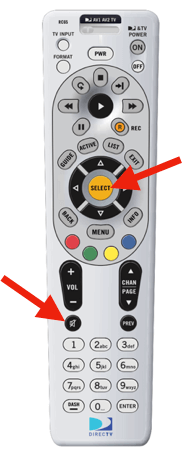
In this article I'm going to show you how to program the DIRECTV remote to a television.
This will allow the remote to control the TV's volume and power.
To get started, slide the mode switch at the top of the remote all the way to the right.
1
Find the code for your TV. Just type the brand of your TV below.
2
Press and hold MUTE and SELECT (at the same time) for 3-4 seconds. Then, enter the above code.
3
Test the remote by pressing volume up or down.
If it didn't work, try the next code in the list. Repeat steps 2 and 3 with each code until the volume changes.
And that's all there is to programming a DIRECTV remote.